Developer Guide — Deploy
How to build, run, flash, and test projectMM on PC and ESP32. Module runtime architecture is in architecture.md; development history is in ../development/.
Quick Start
uv run deploy/ui.py
Open the printed URL in a browser. The Deploy UI lists every pipeline script as a card, grouped by phase. Click Run on any card to stream its output live.
Deploy UI
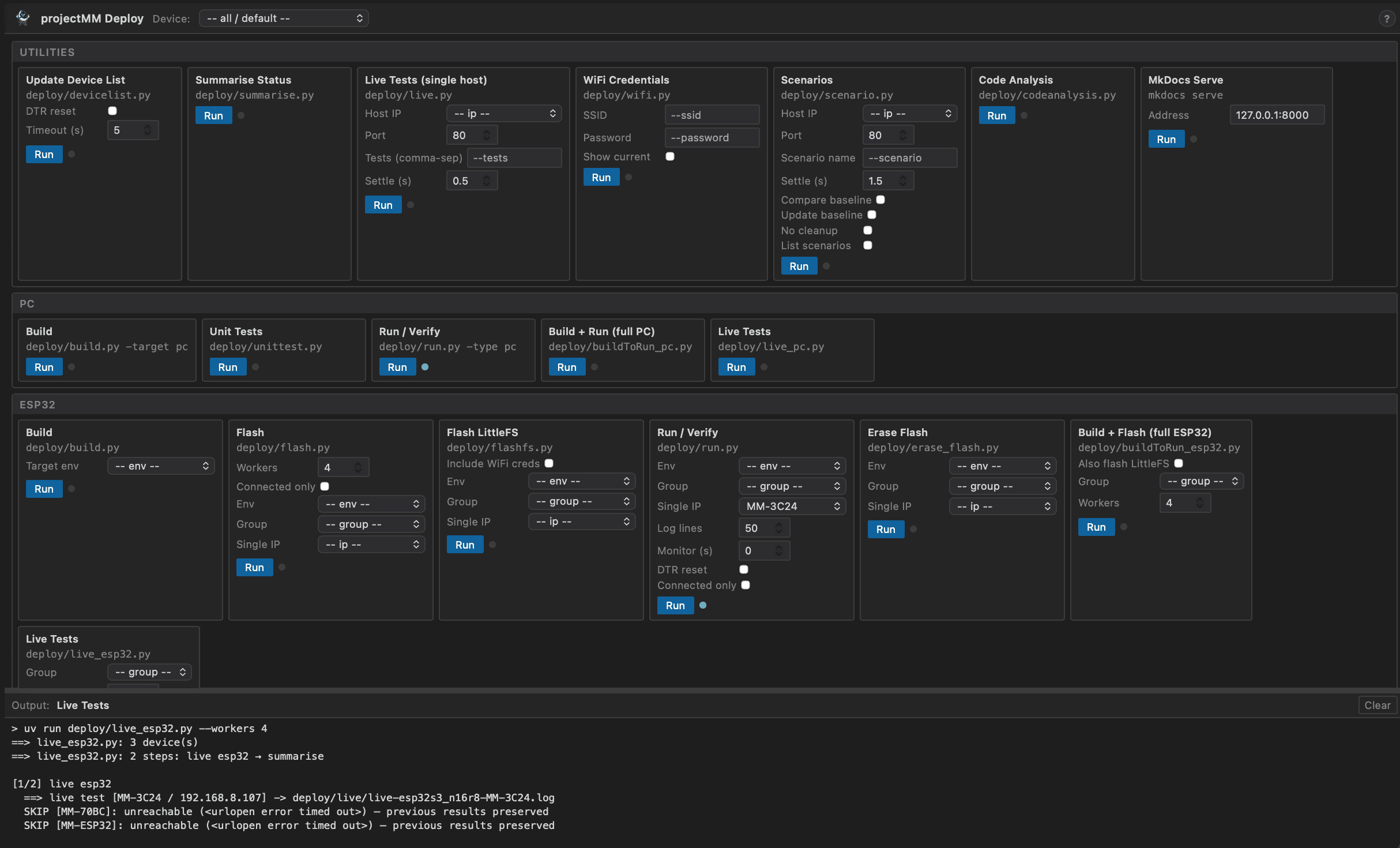
The UI is a local web page served by deploy/ui.py. It requires no extra dependencies — stdlib only.
| Area | Purpose |
|---|---|
| Device dropdown (header) | Select one device to pre-fill per-device fields (IP, env, group) across every card simultaneously |
| Utilities group | Setup and standalone tools: device registry, WiFi credentials, single-host tests, scenarios, code analysis |
| PC group | PC build and test workflow |
| ESP32 group | Hardware build, flash, and test workflow |
| Pipeline group | Full end-to-end automation |
| CI group | Pre-push checks: pre-commit (clang-format + ruff) and ESP32 footprint report |
| Output panel | Live-streamed stdout/stderr; shows exit code on completion |
Each card shows the underlying script name and exposes all its arguments as form controls. Arguments left blank are omitted from the command.
Start the UI:
uv run deploy/ui.py            # http://127.0.0.1:7890/
uv run deploy/ui.py --port N   # custom port
UI, MCP, and CI
All three invoke the same deploy/ scripts. They are parallel interfaces, not a hierarchy.
| Interface | When to use | How it works |
|---|---|---|
Deploy UI (deploy/ui.py) |
Daily development on a workstation | Browser page; streams output live; device dropdown pre-fills args |
MCP (deploy/mcp_server.py) |
Claude Code conversations | Exposes deploy tools directly in the chat; calls scripts via subprocess, returns combined output |
CI (.github/workflows/ci.yml) |
Every push and pull request | Calls scripts directly on GitHub-hosted runners; no UI, no hardware |
The CI group in the Deploy UI bridges the gap: running Pre-commit and Footprint locally before pushing catches the same issues CI would catch, without waiting for a pipeline run.
MCP does not go through the browser UI — it calls the orchestrator scripts directly just as CI does. The MCP tools (run_all_pc, run_all_devices, run_build, etc.) map one-to-one to the Pipeline and ESP32 cards.
MCP tools
| Tool | What it does |
|---|---|
run_all_pc |
Full PC pipeline: build + unit tests + live tests + summarise |
run_all_devices |
Full hardware pipeline: build + flash + live tests + summarise |
run_build(target) |
Build for one env ("pc", "esp32dev", …) |
run_flash |
Flash pre-built firmware to connected ESP32 devices |
run_livetest |
Run live REST tests against PC or ESP32 |
run_summarise |
Regenerate docs/status/index.md |
read_status |
Read current docs/status/index.md without running anything |
list_devices |
List devices from deploy/devicelist.json |
run_script(script, args) |
Run any deploy or CI script — equivalent to clicking a UI card |
read_log(pattern) |
Read a deploy log file or glob pattern for analysis |
run_script and read_log enable an AI-assisted fix loop: a red dot in the UI becomes "call read_log, diagnose, edit source, call run_script to confirm green" — all without leaving the conversation.
Deploy Flow
The four UI groups correspond to the four phases of the deploy pipeline. Run them top to bottom for a full deployment cycle.
1. Setup (Utilities group)
First time — register devices:
Click Update Device List. The script scans USB serial ports, updates deploy/devicelist.json, and automatically refreshes the Device dropdown in the header.
CLI equivalent:
uv run deploy/devicelist.py             # probe all ports
uv run deploy/devicelist.py --reset     # DTR-reset each device to capture hello line
First time — configure WiFi (ESP32 only):
- Click WiFi Credentials, enter SSID and password, click Run. This writes
data/state/sta1.json(gitignored). - In the ESP32 group, click Flash LittleFS with Include WiFi creds checked to bake the credentials into the filesystem image.
Without WiFi credentials, an ESP32 boots into AP mode (MM-XXXX network, http://4.3.2.1) where credentials can be entered via the web UI instead.
Summarise status at any time:
Click Summarise Status to regenerate docs/status/index.md from whatever logs exist. Also available via MCP from Claude Code without starting the UI.
2. PC workflow (PC group)
Typical sequence:
| Step | Card | What happens |
|---|---|---|
| 1 | Build | CMake configure + build → deploy/build/pc/ |
| 2 | Unit Tests | Run doctest suite → deploy/test/ |
| 3 | Live Tests | Start PC server, run REST tests, stop server → deploy/live/ |
Or click Build + Run (full PC) to chain all three in one go.
CLI equivalents:
uv run deploy/build.py -target pc
uv run deploy/unittest.py
uv run deploy/live_pc.py
3. ESP32 workflow (ESP32 group)
Select a device from the Device dropdown to target a single board. Leave it on all / default to run across all test:true devices in parallel.
Typical sequence:
| Step | Card | What happens |
|---|---|---|
| 1 | Build | PlatformIO build for the selected env → deploy/build/esp32/<env>/ |
| 2 | Flash | Flash firmware via esptool → deploy/flash/ |
| 3 | Flash LittleFS | Build + flash LittleFS image (optional, erases device state) |
| 4 | Run / Verify | Hit /api/system, optionally monitor serial for heap data |
| 5 | Live Tests | Run REST tests against running devices → deploy/live/ |
Or click Build + Flash (full ESP32) to chain build + flash + verify in one go.
CLI equivalents:
uv run deploy/build.py -target esp32dev
uv run deploy/flash.py
uv run deploy/live_esp32.py
For a single device:
uv run deploy/flash.py -ip 192.168.1.234
uv run deploy/live_esp32.py -ip 192.168.1.234
4. Full pipeline (Pipeline group)
Click Full Pipeline to run all four orchestrators in sequence:
buildToRun_pc.py— build pc, codeanalysis, unittest, run pc, summariselive_pc.py— live REST tests (server lifecycle managed), scenario baseline, summarisebuildToRun_esp32.py— build esp32, flash (connected only), run mem + HTTP, summariselive_esp32.py— live REST tests against alltest:trueESP32 devices in parallel, summarise
Each orchestrator writes its own docs/status/*.md and runs summarise, so the status table is current at every boundary even if a later step fails.
CLI equivalent:
uv run deploy/all.py
5. Before pushing (CI group)
Run these two cards to catch the same issues GitHub Actions will catch, without waiting for a pipeline run:
| Card | What it checks | CLI equivalent |
|---|---|---|
| Pre-commit | clang-format (C++) and ruff (Python) formatting | uv run pre-commit run --all-files |
| Footprint (esp32dev / esp32s3) | Flash and RAM usage against budget caps | uv run scripts/esp32_footprint.py --log deploy/build/esp32/<env>/build.log |
Footprint requires a prior ESP32 build for the relevant env.
Architecture
Data Flow
Each step owns its full output chain:
log file(s) → docs/status/<step>.md
Steps write their own docs/status/*.md directly after they run. No JSON intermediate between log and markdown. summarise.py reads all step md files and produces docs/status/index.md as a summary of summaries.
docs/status/build-pc-{plat}.md
docs/status/build-esp32-{env}.md
docs/status/codeanalysis.md
docs/status/test-results.md          ──┐
docs/status/run-pc-{plat}.md           │
docs/status/run-{env}-{mac_id}.md      ├──  summarise.py  →  docs/status/index.md
docs/status/flash-{env}-{mac_id}.md    │
docs/status/live-pc-{plat}.md          │
docs/status/live-{env}.md            ──┘
Each step's page is independently readable after that step runs, regardless of whether the full pipeline completed.
Orchestrators
| Script | When to use | Steps |
|---|---|---|
buildToRun_pc.py |
Build + verify PC; no live tests (~30 s warm) | build pc, codeanalysis, unittest, run pc, summarise |
live_pc.py |
PC live tests only (requires prior build) | livetest pc, scenario baseline, summarise |
buildToRun_esp32.py |
Flash + verify connected devices; no live tests | build esp32, flash, run (mem), run (HTTP), summarise |
live_esp32.py |
ESP32 live tests only (requires prior flash) | livetest esp32, summarise |
all.py |
Full pipeline in sequence | buildToRun_pc, live_pc, buildToRun_esp32, live_esp32 |
MCP tools: run_all_pc(), run_all_devices().
Scenario Dual-Runner
Scenario files in deploy/test/scenarios/*.json are executed by two independent runners:
| Runner | File | Stack | Purpose |
|---|---|---|---|
| C++ (in-process) | tests/test_scenarios.cpp |
Direct ModuleManager calls, no HTTP |
Verifies pipeline correctness and fps bounds |
| Python (REST) | deploy/scenario.py |
Full HTTP REST API | Measures real heap; verifies API contract |
The same JSON files drive both runners. scenario.py --compare-baseline (step 2 of live_pc.py) stores fps measurements and warns on regression. Baseline lives in deploy/test/scenarios/baseline.json (gitignored).
Adding a scenario: write one JSON file; both runners pick it up automatically. Use "measure": true on steps where timing matters; use "bounds" for CI-enforced fps thresholds.
Script Dependency Map
all.py
  buildToRun_pc.py
    build.py -target pc
    codeanalysis.py
    unittest.py
    run.py -type pc
    summarise.py
  live_pc.py
    live.py --host localhost          (server started/stopped by live_pc.py)
    scenario.py --compare-baseline   (warning-only, non-fatal)
    summarise.py
  buildToRun_esp32.py                (connected devices only)
    build.py -target <env>           (once per unique connected env)
    flash.py --connected
    run.py --connected --monitor --reset   (serial mem capture)
    run.py --connected               (HTTP verify)
    summarise.py
  live_esp32.py
    live.py --host <ip>              (once per test:true ESP32, in parallel)
    summarise.py
Shared library: deploy/_lib.py provides pc_platform(), run_step(), select(), wait_for_esp32s(), and device-list helpers used by all scripts above.
Requirements
PC (macOS / Linux)
- CMake ≥ 3.16
- A C++17-capable compiler (Clang or GCC)
- uv (Python package manager, replaces bare
python3for all deploy scripts) - Git (used by CMake to download doctest at configure time)
PC (Windows)
- CMake ≥ 3.16
- llvm-mingw (UCRT variant, Clang 18+) — provides
clang++and the UCRT runtime. MSVC is not supported. - Ninja — required as the CMake generator on Windows (single-config; binary lands at a predictable path).
- uv (Python package manager)
- Git
Add llvm-mingw/bin and ninja to PATH before building. With scoop:
scoop install llvm-mingw ninja
Windows Long Path support (recommended, one-time): PlatformIO's ESP32 framework generates very long include paths. Without Long Path support enabled, PlatformIO prints a warning and shortens paths automatically — the build still succeeds, but with a performance penalty. Enable it once to suppress the warning:
# Run PowerShell as Administrator, then restart Windows
New-ItemProperty -Path 'HKLM:\SYSTEM\CurrentControlSet\Control\FileSystem' `
  -Name 'LongPathsEnabled' -Value 1 -PropertyType DWORD -Force
ESP32
- PlatformIO Core CLI — self-managed penv at
~/.platformio/penv/; requires Python 3.10–3.13 (see below) - USB cable to flash
First-time setup
Git hooks are installed automatically on the first build:
- PC:
cmake -B deploy/build/pc(the configure step) installs the hooks. - ESP32:
platformio runinstalls the hooks viascripts/install_hooks.py.
To install hooks without building (e.g. documentation-only work):
git config core.hooksPath .githooks
Device registry — deploy/devicelist.json
deploy/devicelist.json (gitignored) is a JSON array listing all known devices. A template is committed; copy it to get started:
cp deploy/devicelist.json.template deploy/devicelist.json
Key fields per entry:
| Field | Meaning |
|---|---|
type |
"pc" or "esp32" |
device_name |
Human label (e.g. "MM-70BC") |
ip |
WiFi/network IP (ESP32); "localhost" for PC |
port |
Serial port path (ESP32 only) |
mac |
MAC address (ESP32 only) |
env |
PlatformIO environment name (ESP32 only) |
test |
true = include in default all.py runs |
group |
Optional group name for --group filtering |
Device selection
All deploy scripts accept -<field> <value> filters to select a subset of devices from devicelist.json:
uv run deploy/flash.py -type esp32              # all test:true ESP32 devices
uv run deploy/live_esp32.py -ip 192.168.1.234   # single device by IP
uv run deploy/live_esp32.py -env esp32s3_n16r8  # all test:true devices of this env
uv run deploy/run.py -device_name MM-70BC       # single device by name
Multiple flags AND together. No flags = all test:true devices.
In the Deploy UI, selecting a device from the Device dropdown pre-fills all IP, env, and group fields simultaneously.
Run the PC server manually
# macOS / Linux
deploy/build/pc/macos/projectMM --count 999999999   # run until Ctrl-C
deploy/build/pc/macos/projectMM --count 2000        # run ~2 s then exit cleanly
deploy/build/pc/macos/projectMM --verbose           # lifecycle + health logging

# Windows
deploy\build\pc\windows\projectMM.exe --count 999999999
Always run from repo root so the server finds its state files in state/.
Serial memory monitoring
# Capture boot balance sheet from first byte: reset device, record 30 s
uv run deploy/run.py -device_name MM-70BC --monitor 30 --reset

# Watch for fragmentation warnings on a running device (no reset)
uv run deploy/run.py -device_name MM-70BC --monitor 60
--monitor <seconds> switches to time-based serial capture; each line is timestamped. [MemBoot] and [MemLive] lines are echoed live to the console and written to a filtered run-<env>-MM-<last4>-mem.log alongside the full log.
--reset toggles DTR before capturing so [MemBoot] boot balance-sheet lines are recorded from the very start of boot.
Resetting stale LittleFS state
Flashing new firmware does not clear the LittleFS partition. If the running binary loads stale state from a previous firmware version:
uv run deploy/flashfs.py
Then re-add modules via the UI or REST API.
Live system tests
deploy/live.py runs REST API integration tests against a running projectMM server — PC or ESP32 — with no USB cable required.
Options
| Flag | Default | Meaning |
|---|---|---|
--host |
localhost |
Target host (IP or hostname) |
--port |
80 |
HTTP port |
--tests |
all | Comma-separated list of test names to run |
--settle |
0.5 |
Seconds to wait after each setup step before asserting |
--out |
(none) | Path to write JSON results |
Infrastructure protection
delete_all_modules() skips modules whose type is in INFRA_TYPES:
INFRA_TYPES = {
    "NetworkModule", "SystemStatusModule", "WifiStaModule", "WifiApModule",
}
These modules are never deleted by the test suite — deleting them would leave an ESP32 unreachable after a reboot.
Test descriptions
| Test | Description |
|---|---|
test0 |
Ensures all infrastructure modules are present; adds any that are missing. Runs first so subsequent tests can rely on SystemStatusModule health data. |
test1 |
Deletes all non-infra modules, then builds a fresh pipeline: DriverLayer + GridLayout + EffectsLayer + RipplesEffectModule. Verifies modules are present and RipplesEffect is producing non-zero checksums. |
test2 |
Adds a second EffectsLayer with LinesEffectModule. Verifies both effects run simultaneously and the driver blends them. |
test3 |
Resizes GridLayout (depth 1→5, width 10→20) and verifies the pipeline resizes without crashing. Checksums must change as the pixel space grows. |
Adding a new test
- Define a function in
deploy/live.py:
def test4_my_test(client: Client, r: R, settle_s: float):
    """Short description shown in summary output."""
    result = client.add_module("MyModule", "mymod1")
    r.check(result.get("ok"), "MyModule added")
    time.sleep(settle_s)
    mods = client.modules()
    r.check("mymod1" in mods, "mymod1 present")
- Register it in
main():
runner.register("test4", test4_my_test)
Tests run in registration order. The first line of the docstring becomes the description in JSON results.
Log files
All logs live under deploy/ (gitignored by default):
| Path | Contents |
|---|---|
deploy/build/pc/{platform}/build.log |
CMake configure + build output |
deploy/build/esp32/<env>/build.log |
PlatformIO compile output per environment |
deploy/test/run-tests.log |
doctest output |
deploy/run/run-pc-{platform}.log |
PC /api/system response |
deploy/run/run-<env>-MM-<last4>.log |
ESP32 /api/system response or serial snapshot |
deploy/run/run-<env>-MM-<last4>-mem.log |
Filtered [MemBoot]/[MemLive] lines (created by --monitor) |
deploy/flash/flash-<env>-MM-<last4>.log |
esptool flash output per device |
deploy/flash/flashfs-<env>-MM-<last4>.log |
esptool LittleFS flash output per device |
deploy/live/live-pc-{platform}.log |
PC server output + live test log |
deploy/live/live-<env>-MM-<last4>.log |
Live test log per ESP32 device |
docs/status/*.md |
Per-step status pages written directly by each deploy script |
docs/status/index.md |
Summary table: all devices × all steps (served by mkdocs) |
CI
GitHub Actions runs on every push to main and every pull request (.github/workflows/ci.yml):
| Job | Runner | What it does |
|---|---|---|
| PC (macOS) | macos-latest |
CMake + Clang build, doctest suite, run verification |
| PC (Windows) | windows-latest |
CMake + llvm-mingw/Clang build, doctest suite (Ninja generator) |
ESP32 (esp32dev) |
ubuntu-latest |
PlatformIO compile + footprint report |
ESP32 (esp32s3_n16r8) |
ubuntu-latest |
PlatformIO compile + footprint report |
CI artifacts (uploaded on every run): deploy/ directory containing build logs, test results, and run output.
Footprint report
Every CI run appends an ESP32 flash/RAM report to the job summary. To run locally:
uv run scripts/esp32_footprint.py --log deploy/build/esp32/esp32dev/build.log
Budget caps and thresholds are in standards.md — Footprint Budgeting.
→ Memory and Filesystem test coverage
PlatformIO Python version
PlatformIO requires Python 3.10–3.13. If your system Python is newer (e.g. Homebrew upgraded to 3.14+), the build will fail.
The deploy/build.py script automatically prepends PlatformIO's own Python to the PATH before invoking pio, so it works correctly regardless of system Python version.
If you need to invoke pio directly from a shell:
PATH=~/.platformio/python3/bin:~/.platformio/penv/bin:$PATH platformio run
Permanent fix — install PlatformIO via pipx with a pinned Python:
brew install pipx && pipx ensurepath
brew install python@3.12
pipx uninstall platformio 2>/dev/null || true
pipx install --python $(which python3.12) platformio
PlatformIO IDE index rebuilding warning
Running build.py for multiple environments back-to-back triggers the PlatformIO VS Code extension's file watcher on .pio/libdeps/. Fix by excluding .pio/ from VS Code's file watcher in .vscode/settings.json:
{
    "files.watcherExclude": {
        "**/.pio/**": true
    }
}